
Are they warming up
or cooling off?
ChatAffinity reads your own chats on your Mac and shows how someone's texting toward you has changed, day by day, with the evidence behind every point.
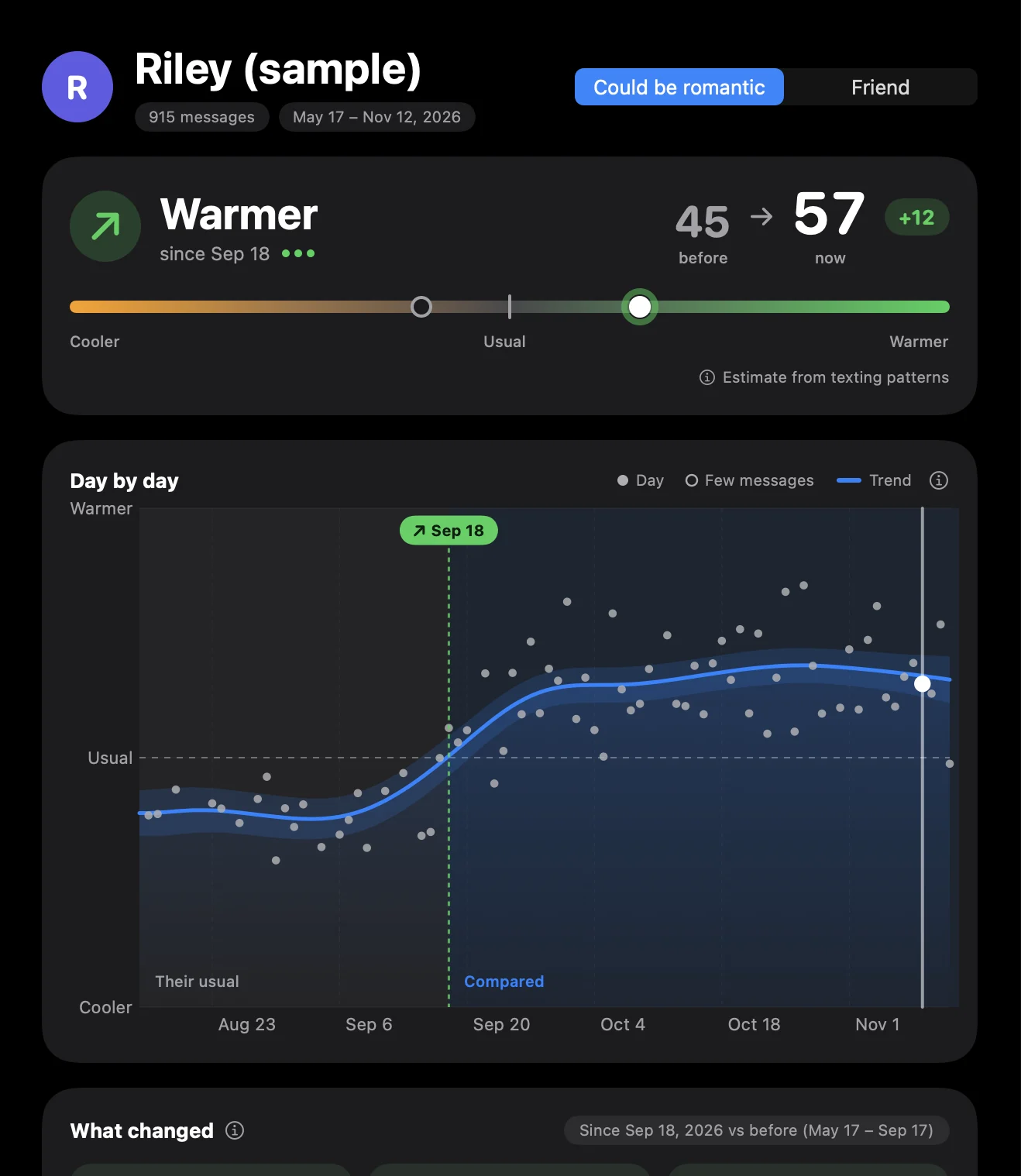
One person, measured against their own past.
Everyone texts differently. A three-minute reply is fast for one person and slow for another, so ChatAffinity never compares people with each other. It learns how this person usually is with you, then shows when that changes.
Pick a chat
iMessage chats appear as soon as you grant access. Instagram and WhatsApp chats come in from inside the app.
Read the line
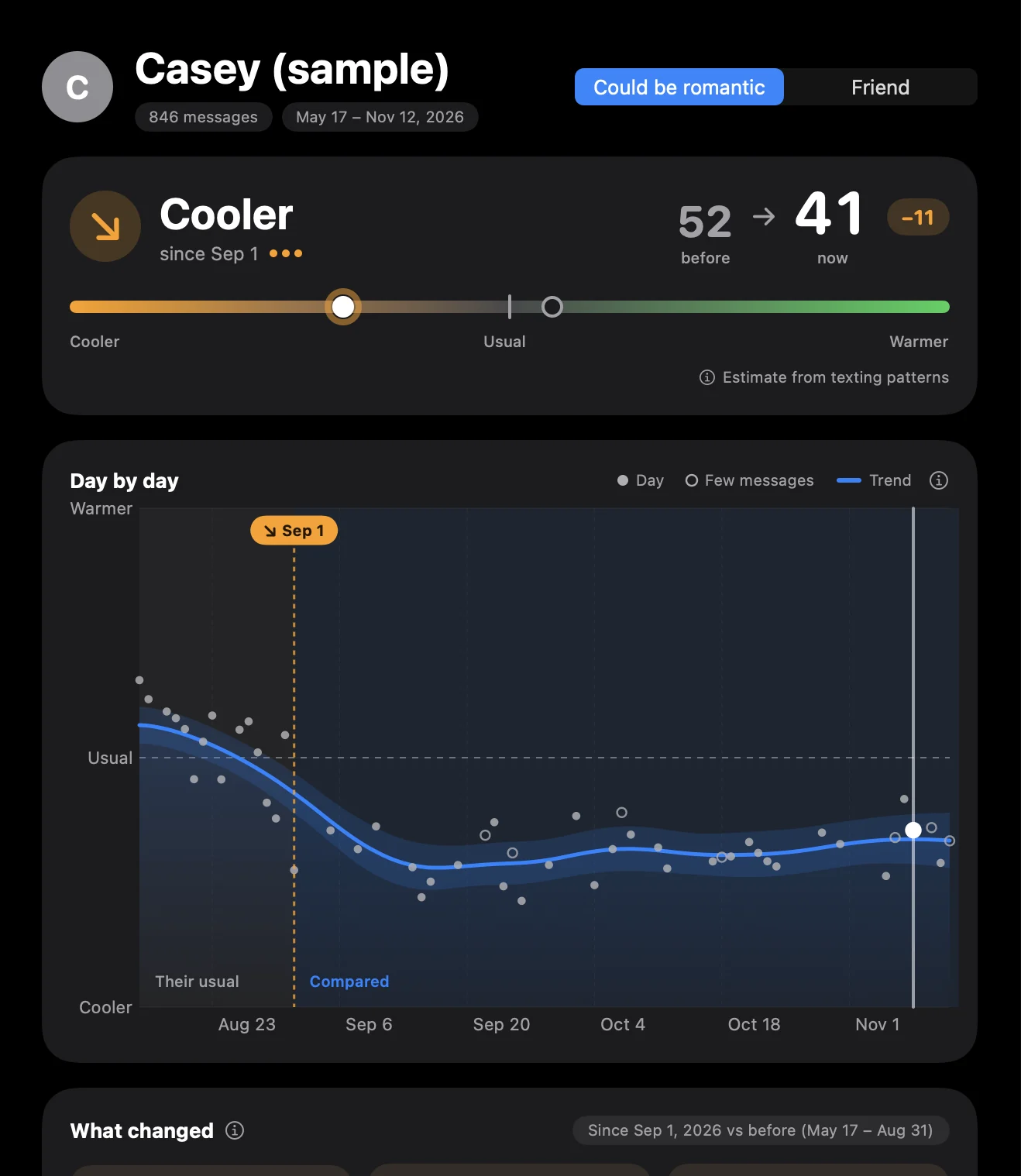
One score per day, drawn as a trend. 50 is their usual with you. Above it they are warmer than usual; below it, cooler.
Open any day
Click a point to see what moved it: how fast they replied, who started the conversation, and the messages themselves.
The things you already notice, counted.
ChatAffinity counts patterns in how they text you. It does not try to read minds, and it shows you the numbers before and after so you can judge for yourself.
- Reply speed
- Replies to you
- Who starts chats
- Questions they ask
- Laughs & emoji
- Affection
- Plans together
- Reactions
- Message length
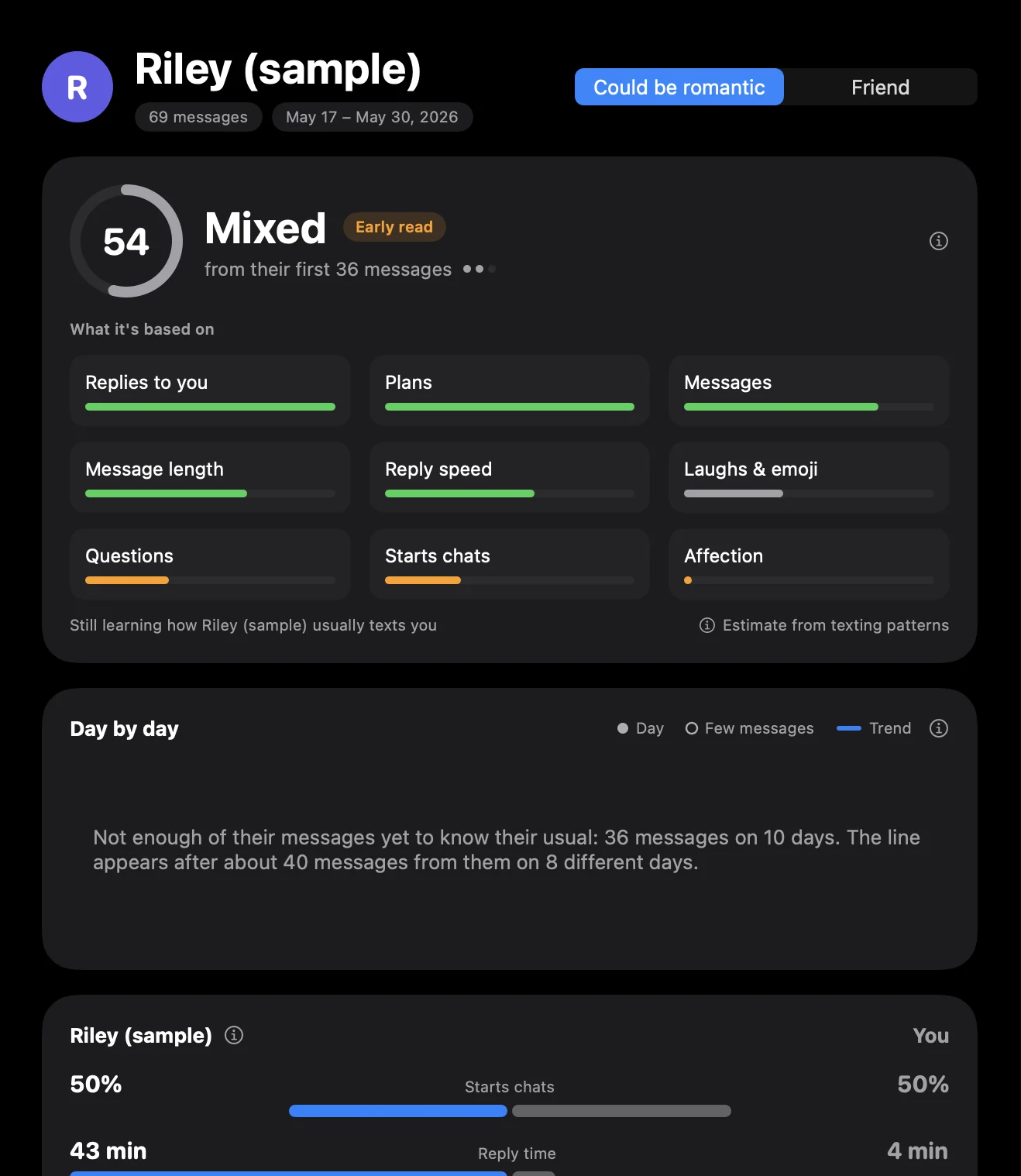
An early read, clearly marked as early.
A trend needs history: about 40 messages from them across 8 days. Before that, ChatAffinity gives a rougher first impression from around 20 messages, and says how little it has to go on.
Once there is enough history, the early read steps aside for the day-by-day line.
Built so there is nothing to trust us with.
These are your most private conversations. The app is designed so they stay where they already are.
Everything runs on your Mac
The analysis happens on your computer. There is no ChatAffinity server that receives your messages.
No account, no sign-up
Nothing to register. We do not know who you are, who you talk to, or what the app shows you.
No analytics, no tracking
The app contains no analytics or advertising code. This website loads no trackers and sets no cookies.
The details are in the privacy policy, written in plain language.
Your chats, read where they already live.
iMessage
Read directly from the Messages app's data on your Mac, after you turn on Full Disk Access once in System Settings. Read-only.
Sign in to instagram.com inside the app and pick a chat, or import the file from Instagram's own “Download your information”.
Link WhatsApp Web inside the app by scanning the QR code with your phone, or import a chat you exported yourself.
An estimate from texting patterns, not a fact about anyone's feelings.
- It only sees the chat. People who see each other every day often text less. A quieter chat is not always a cooler person.
- It shows change, not a verdict. The line compares someone with their own usual. It cannot tell you whether they like you.
- It says when it doesn't know. With too few messages it shows nothing rather than a guess, and small differences are marked as possibly chance.
- It gives no advice. What to do with what you see is yours to decide.
Before you download
Why does it need Full Disk Access?
macOS keeps your iMessage history in a protected folder. Full Disk Access is the only way Apple lets any app read it. ChatAffinity opens that data read-only and never changes or copies your messages elsewhere. If you only use Instagram or WhatsApp in the app, you can skip this permission.
Is it safe to sign in to Instagram or WhatsApp inside the app?
The app shows the real instagram.com or WhatsApp Web page in a built-in browser view, and you sign in on that page exactly as you would in Safari. Your password goes to that service, not to us. The app then reads the chat you chose from what the page itself displays. You can use the file-import route instead if you prefer not to sign in.
Is there an iPhone or Windows version?
No. ChatAffinity is a Mac app. iOS does not let apps read your message history, so the analysis has to happen on a Mac.
Why isn't it on the Mac App Store?
Apps on the Mac App Store must run in a sandbox, and a sandboxed app cannot read your iMessage history. ChatAffinity is distributed directly instead, signed with an Apple Developer ID.
Does the other person find out?
No. The app only reads chats that are already on your side. It sends no messages and nothing is shared with anyone.
Which languages does the app speak?
English, Simplified and Traditional Chinese, Japanese, Korean, Spanish, French and German, and it recognises warm words, questions and plans in chats written in those languages.
See how it's really going.
Try it with the built-in sample chats first. No permission needed to look around.